
- Learn JavaScript by doing cool things. Let us program a logical skeleton of a simple Bug Smasher Game.
In this article I will create a simple Bug Smashing Game using HTML, CSS and JavaScript. This simple game will keep on creating new bugs and placing them on the game screen at random positions. The game will involve a player clicking on these randomly appearing bugs to “smash” them. The score will increase when a bug is smashed.
Game Assets
In this simple game we will use only one image to represent the bug. This image has been taken from giphy.com

Game Overview
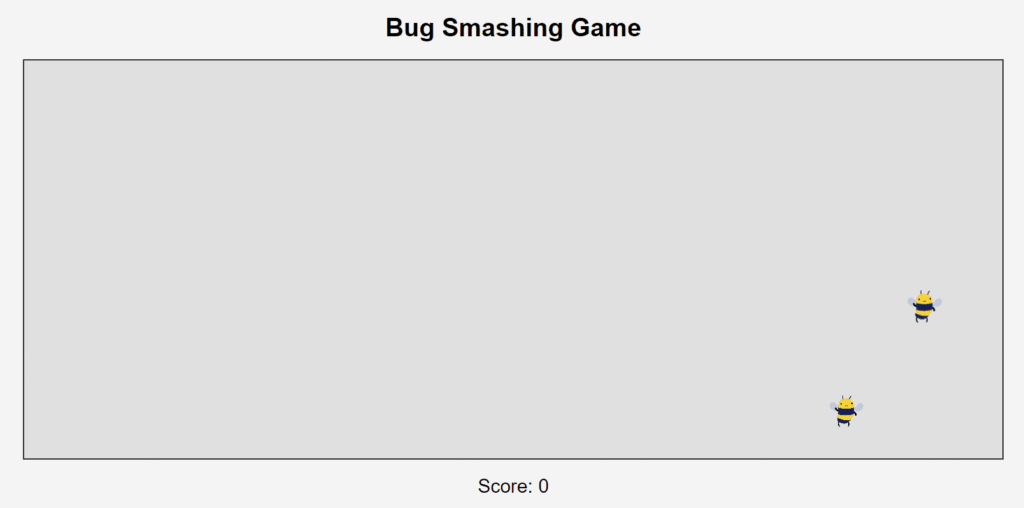
Below is the screenshot of what we are going to create. Player can use mouse clicks to give input to the game and the game goes on.
The HTML Page
Let us first create a HTML web page. This web page will display a game area and a score display.
Create an index.html file to set up the game structure.
<!DOCTYPE html>
<html lang="en">
<head>
    <meta charset="UTF-8">
    <meta name="viewport" content="width=device-width, initial-scale=1.0">
    <title>Bug Smashing Game</title>
    <link rel="stylesheet" href="style.css">
</head>
<body>
    <h1>Bug Smashing Game</h1>
    <div id="gameArea">
        <!-- Bugs will be dynamically added here -->
    </div>
    <div id="score">Score: 0</div>
    <script src="script.js"></script>
</body>
</html>
Adding CSS
Styles the game area and bugs. We need a bug image (bug.gif) to represent the bugs. Adjust the path if necessary. Create a styles.css file to style the game area and bugs.
body {
    font-family: Arial, sans-serif;
    text-align: center;
    background-color: #f4f4f4;
    margin: 0;
    padding: 0;
}

#gameArea {
    width: 80%;
    height: 500px;
    margin: 20px auto;
    border: 2px solid #333;
    position: relative;
    background-color: #e0e0e0;
    overflow: hidden;
}

.bug {
    width: 50px;
    height: 50px;
    background-image: url('bug.gif'); /* Use a small bug image */
    background-size: cover;
    position: absolute;
    cursor: pointer;
}

#score {
    font-size: 24px;
    margin-top: 20px;
}
And Now JavaScript
Create a script.js file for the game logic.
const gameArea = document.getElementById('gameArea');
const scoreElement = document.getElementById('score');
let score = 0;
const bugSize = 50;

// Function to get a random position within the game area
function getRandomPosition() {
    const maxX = gameArea.clientWidth - bugSize;
    const maxY = gameArea.clientHeight - bugSize;
    const x = Math.random() * maxX;
    const y = Math.random() * maxY;
    return { x, y };
}

// Function to create a new bug
function createBug() {
    const bug = document.createElement('div');
    bug.classList.add('bug');
    const { x, y } = getRandomPosition();
    bug.style.left = `${x}px`;
    bug.style.top = `${y}px`;

    bug.addEventListener('click', () => {
        score++;
        scoreElement.textContent = `Score: ${score}`;
        bug.remove();
        createBug(); // Create a new bug
    });

    gameArea.appendChild(bug);
}

// Start the game by creating the first bug
createBug();

// Continuously create bug at intervals
setInterval(createBug, 1000); // Adjust the interval as needed
Explanation:
getRandomPosition(): Returns random coordinates for the bug to appear within the game area.createBug(): Creates a bug element, positions it randomly, and adds a click event to update the score and remove the bug.setInterval(createBug, 1000): Creates new bugs at regular intervals (1 second in this case).
This example is very basic and can be expanded with additional features. Feel free to enhance the game and keep practicing your JavaScript skills. Happy coding!